DICOM TLS encryption: how to secure imaging traffic
DICOM TLS encryption secures imaging traffic in transit, covering profiles, TLS versions, certificates, and checks hospitals and imaging centers need.
DICOM TLS encryption is the use of Transport Layer Security to encrypt traditional DICOM network transfers between modalities, PACS, workstations and other imaging systems, so protected health information cannot be read in transit. The DICOM standard defines how to use TLS for DIMSE transfers and HTTPS for DICOMweb, but it does not mandate encryption, so your facility policy and your vendors' configuration decide whether it is on.
TL;DR
- DICOM defines TLS for DIMSE transfers and HTTPS for DICOMweb, and recommends registered port 2762 (dicom-tls) for DIMSE over TLS.
- DICOM's BCP 195 profile requires TLS 1.2 support, and TLS 1.3 may also be supported and preferred when both sides offer it.
- Certificates in DICOM's modified BCP 195 profile need RSA keys of at least 2048 bits, or ECC keys of at least 256 bits, with SHA-256 or stronger hashing.
- TLS protects data in transit only. Access control, audit trails, segmentation and patching stay your responsibility.
- AstraRad delivers final signed reports into your existing PACS under a signed BAA, and we are open about the fact that this article supports our own services.
Table of Contents
- What is DICOM TLS encryption?
- Which DICOM traffic can use TLS?
- Why does AstraRad write about DICOM TLS?
- Which TLS versions should DICOM systems use today?
- How do you configure DICOM TLS certificates and trusted endpoints?
- What does DICOM TLS not protect?
- Does DICOM TLS slow down imaging workflows?
- What should you ask a teleradiology vendor about DICOM TLS?
- How does AstraRad fit into your PACS and security review?
- How do you build a DICOM TLS rollout plan?
- FAQ
- Sources
What is DICOM TLS encryption?
DICOM TLS encryption is a security profile that wraps a DICOM network connection in a TLS session. TLS (Transport Layer Security) is a cryptographic protocol that encrypts data between two endpoints, authenticates them with X.509 certificates, and detects tampering. In DICOM, the two endpoints are application entities, such as a CT scanner sending to a PACS.
Without TLS, a traditional DICOM association sends patient names, IDs, study descriptions and pixel data in a form anyone on the network path could capture. With TLS, the sending and receiving systems first agree on protocol version and cipher suite, verify each other's certificates where configured, and then exchange the DICOM messages inside an encrypted channel.
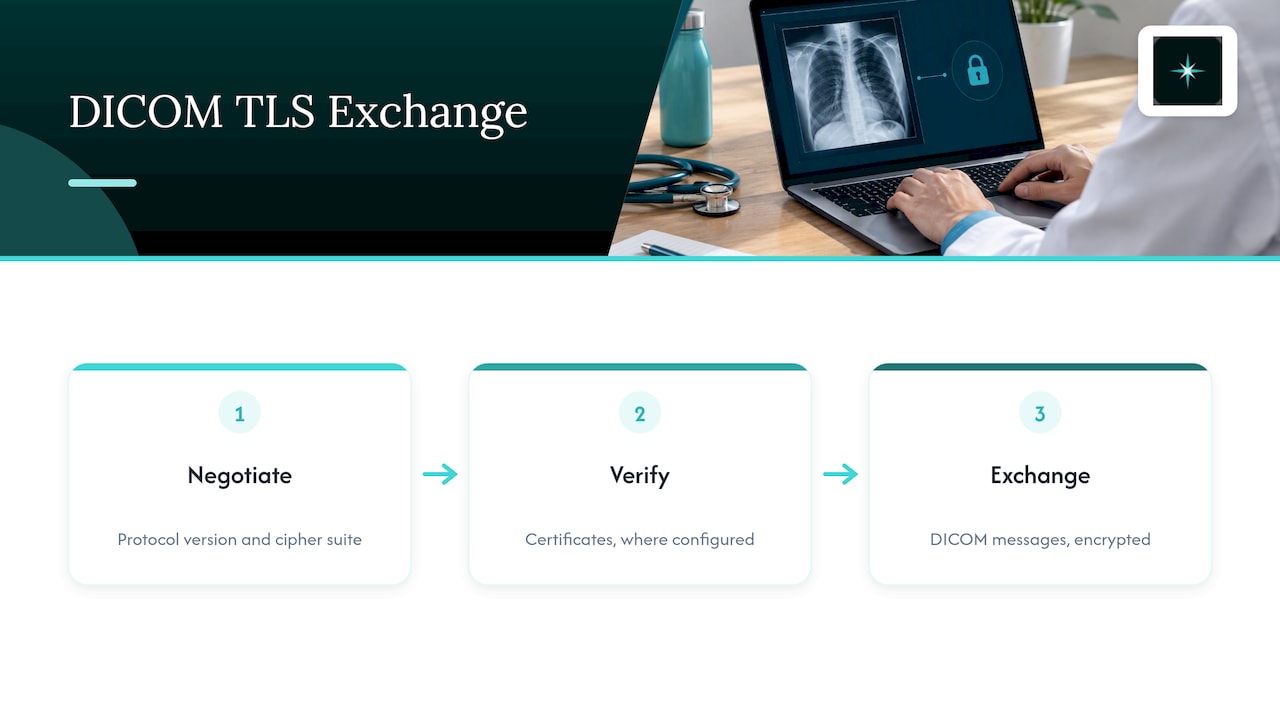
DICOM describes this as a Secure Transport Connection Profile. According to PS3.15, section 6.2, such a profile specifies the TLS framework and negotiation, entity authentication, session-key distribution, the encryption protocol and its parameters, and the integrity-check mechanism. In practice, a device vendor claims support for one or more named profiles in its DICOM Conformance Statement, and your administrators choose which one to enable.
Two terms are worth fixing before you go further. DIMSE is the DICOM Message Service Element, the classic set of network commands (C-STORE, C-FIND, C-MOVE) that modalities and PACS use. DICOMweb is a family of RESTful services (STOW-RS, QIDO-RS, WADO-RS) that carry DICOM over HTTP.
Which DICOM traffic can use TLS?
Both main DICOM transport styles can be encrypted, but through different mechanisms. The DICOM Standards Committee states that DICOM defines TLS for traditional DIMSE transfers and HTTPS for DICOMweb. Encrypting a file on disk is a separate topic, handled by the Secure DICOM File Format rather than by a transport profile.
| Traffic type | Encryption mechanism | Port guidance | Notes |
|---|---|---|---|
| DIMSE (C-STORE, C-FIND, C-MOVE) | TLS, negotiated directly | Registered port 2762, named dicom-tls | Plain DICOM commonly uses port 104 or 11112, so a TLS listener is a separate service |
| DICOMweb (STOW-RS, QIDO-RS, WADO-RS) | HTTPS (HTTP over TLS) | Must differ from DIMSE TLS ports | The HTTPS connection may be shared with other HTTPS traffic |
| Stored files and archives | Secure DICOM File Format or storage-layer encryption | Not applicable | Protects data at rest, not the network session |
| Tunneled traffic over a VPN | VPN encryption | Depends on the tunnel | Possible, but DICOM notes it can be inadvisable from a cybersecurity perspective |
The port rule matters during firewall changes. DICOM requires that DICOMweb TLS listener ports differ from DIMSE TLS ports, even though the DICOMweb HTTPS connection can sit alongside other HTTPS traffic. If a vendor asks you to open one port for both, ask for the conformance statement before you change a rule.
DICOM also notes that DIMSE TLS uses direct TLS negotiation rather than STARTTLS. That means DIMSE TLS is not exposed to the STARTTLS vulnerabilities discussed for some legacy protocols.
Why does AstraRad write about DICOM TLS?
AstraRad is a US teleradiology service that delivers final signed reports read by board-certified subspecialists. We publish this guide because encrypted image transport is one of the first questions a hospital administrator, imaging center director or radiology group leader raises when outsourcing reads, and we have a commercial interest in being the service you choose.
Here is what we can state about our own service. Every study is read inside the United States, reports go straight into your existing PACS with no extra portal, and our integration is DICOM conformant. AstraRad is HIPAA aligned and works as a business associate under a signed BAA. Pricing is per report with no minimums. For a plain walk-through of the workflow from your PACS to a signed report, see how teleradiology works with AstraRad.
What we do not do is answer your TLS questions from a brochure. The exact profile, certificate arrangement and ports for your connection are settled during onboarding and written into your coverage plan, and the sections below show you what to ask for.
Which TLS versions should DICOM systems use today?
TLS 1.2 is still acceptable in DICOM, and TLS 1.3 is the version to prefer wherever both sides support it. DICOM's BCP 195 profile requires TLS 1.2 support, allows TLS 1.3, and says clients should attempt TLS 1.3 and servers should prefer it when offered. All older versions are outside the profile.
The two DICOM profiles differ slightly:
| Profile | TLS 1.2 | TLS 1.3 | Behavior |
|---|---|---|---|
| BCP 195 TLS Secure Transport Connection Profile (B.12) | Required | Optional | Clients try TLS 1.3 first, servers prefer it when offered |
| Modified BCP 195 TLS Secure Transport Connection Profile (B.13) | Required for servers | Required for servers | TLS 1.3 preferred, TLS 1.2 as fallback |
This tracks federal guidance. NIST Special Publication 800-52 Revision 2 requires TLS 1.2 with FIPS-based cipher suites for government TLS servers and clients and required TLS 1.3 support by January 1, 2024. Private hospitals are not bound by that publication, but it is a common benchmark in security questionnaires and procurement reviews.
A practical reading for administrators: a CT scanner that only speaks an older TLS version, or only the weaker legacy DICOM profiles, is a finding. Record it in your device inventory, ask the manufacturer for a firmware path, and use network segmentation to limit exposure until it is upgraded.
How do you configure DICOM TLS certificates and trusted endpoints?
Configuring DICOM TLS means installing a certificate and private key on each application entity, loading the certificate authorities you trust, selecting a permitted profile, and testing every sender and receiver pair. DICOM assumes an application entity can obtain X.509 certificates and validate peer certificates through a local CA, a public CA or another trusted third party.
A workable sequence for a PACS administrator:
- Inventory the endpoints. List every modality, gateway, PACS node, VNA, viewer and outside reading connection that sends or receives DICOM, with the conformance statement for each.
- Pick a certificate authority model. A private internal CA is common for on-premises devices. Public CAs suit internet-facing DICOMweb endpoints.
- Issue certificates that meet the profile. DICOM's modified BCP 195 profile requires RSA keys of at least 2048 bits, ECC keys of at least 256 bits, and SHA-256 or stronger hashing.
- Decide on mutual authentication. DICOM's BCP 195 profile requires servers to support bidirectional mutual authentication, while client support is encouraged but not required. Where devices support it, mutual TLS gives each side proof of the other's identity.
- Load the trust store. Each endpoint needs the root and intermediate certificates it should accept, and nothing broader.
- Open the right ports. Allow the DIMSE TLS listener, commonly port 2762, only between named hosts, and keep DICOMweb on its own HTTPS port.
- Test, then enforce. Run a test association for each pair, confirm the negotiated version and cipher suite in logs, and only then disable the plain-text listener.
The profile does not fix every setting for you. DICOM's guidance says a device may support multiple TLS profiles, and site administrators determine the appropriate configuration, with cipher suites negotiated by the TLS implementation. Document your choice, because a security reviewer will ask for it.
What certificate checks should an endpoint perform?
A correctly configured endpoint checks that the peer holds the matching private key, that the certificate signature chains to a trusted CA, that it is inside its validity period, and, where you operate revocation lists, that it has not been revoked. The open-source DCMTK toolkit documents exactly these checks and requires a trusted-root certificate list for peer verification. Its documentation also warns that accepting any remote certificate is not recommended, which is worth remembering when a test setting is left on in production.
What interoperability problems come up most often?
Most failed connections trace back to a short list of mismatches:
- One side offers only TLS 1.2 cipher suites that the other has disabled.
- A certificate has expired, or the intermediate CA was never installed.
- The application entity title does not match what the receiver expects.
- A firewall allows port 104 but not the TLS port.
- A device presents a certificate that its peer does not trust because the trust store is incomplete.
Log the failure reason on both ends. TLS alerts usually name the cause, and that saves a vendor call.
What does DICOM TLS not protect?
DICOM TLS protects data in transit between two authenticated endpoints, and nothing more. The DICOM Standards Committee's security model treats TLS as a transport mechanism, not a complete security program: access control, audit trails, physical protection, user identity and local environment security remain the responsibility of the application entity and the organization.
That has concrete consequences:
- Identity is not authorization. DICOM's Zero Trust whitepaper explains that mutual TLS can establish system identity, but AE titles are only asserted and are not universally unique. A valid certificate does not mean a device should be allowed to query every study.
- Stored data needs its own controls. A PACS archive on an unencrypted volume is not helped by encrypted transfers.
- Devices still need care. The HHS 405(d) program identifies outdated equipment, unpatched devices, default credentials, network heterogeneity and inadequate segmentation as risks for connected medical devices, and recommends assessments, vendor coordination, validated patching, hardening and monitoring.
- Plain-text leftovers matter. An HHS advisory bulletin dated December 18, 2024 lists unencrypted transmissions, outdated firmware, inadequate authentication and insecure network services as vulnerabilities in operational technology and Internet of Medical Things environments that can enable lateral movement. It also recommends restricting remote access with encrypted VPN traffic and multifactor authentication.
In short, encrypt the link, then segment the network, inventory the devices and log the access. Each control covers a gap the others leave.
Is a VPN a substitute for DICOM TLS?
A VPN is a network tunnel that encrypts traffic between two sites, and it can protect DICOM traffic that is otherwise unencrypted. DICOM cautions that encryption choice is a facility policy and vendor-implementation decision, and that relying on a VPN alone can be inadvisable from a cybersecurity perspective. A VPN protects the tunnel, while TLS can also authenticate the individual application entities. Many facilities use both.
Does DICOM TLS slow down imaging workflows?
TLS adds some processing for the handshake and for encrypting each message, so a poorly sized gateway can show higher latency on large studies. On current server hardware the cost is usually small compared with the transfer itself, but you should measure it on your own network, particularly for multi-gigabyte CT, MR and tomosynthesis studies and for older modalities with limited CPU.
Three things keep the effect manageable:
- Reuse connections. Sending a whole study over one association avoids repeating the handshake for every image.
- Size gateways for encryption. Scanners and routers that do their own encryption need adequate CPU. Modern cipher suites are efficient on current processors.
- Baseline before you enforce. Record study transfer times in plain text and with TLS in a test window, then compare.
Monitoring is the larger operational question. NIST notes that TLS 1.3 provides state-of-the-art protection but complicates required monitoring and auditing of incoming traffic, and it describes methods for managing access to keys for that purpose. If your security team inspects traffic at a boundary device, plan how it will see TLS 1.3 sessions, or move monitoring to the endpoints and to logs from the PACS and gateways.
What should you ask a teleradiology vendor about DICOM TLS?
Ask for the exact transport profile, the certificate model and the written responsibilities on both sides before any studies move. Outsourced reading adds a connection between your PACS and an outside reading environment, and that connection should be documented in the contract, not left to an email thread.
Use this checklist in procurement and security review:
| Question | What a complete answer includes |
|---|---|
| Which transport profile is used? | DICOM BCP 195 or modified BCP 195, or HTTPS for DICOMweb, named explicitly |
| Which TLS versions are enabled? | TLS 1.2 and, where supported, TLS 1.3, with older versions disabled |
| How are certificates issued and renewed? | CA model, key sizes, validity periods, who rotates them and when |
| Is mutual authentication used? | Yes or no per connection, and which side presents which certificate |
| Which ports and hosts are involved? | Named source and destination, TLS listener ports, firewall rules |
| Who signs the BAA? | A signed business associate agreement covering the data flow |
| How is the connection logged? | Association and TLS failure logs, retention, and who can read them |
| Where are studies read? | Location of the reading, which for a US buyer should be inside the United States |
A vendor that answers these in writing is easier to approve. If the answer is a slogan, treat it as an open item on your security questionnaire.
How does AstraRad fit into your PACS and security review?
AstraRad is a US teleradiology service that delivers final signed reports read by board-certified subspecialists. We route each study to a subspecialist matched to the modality and body part, across ten subspecialties and twelve study types, on scheduled US shifts 24/7/365, with every read performed inside the United States.
For your technical team, the relevant points are these: reports go straight into your existing PACS with no extra portal, the integration is DICOM conformant, and we work as a business associate under a signed BAA. Turnaround is committed by contract and measured from last-image arrival to radiologist signature: STAT under 4 hours, routine 24 to 48 hours, and stroke protocol under 30 minutes. The first signed report arrives within 10 business days of countersignature, and one in twenty reports is independently double-read, blind, for peer review.
If you are comparing coverage models for a hospital, our page on teleradiology for hospitals covers night, emergency department and rural cover. For cost, pricing is per report with no minimums, and you can request a complete per-report rate card at /pricing, delivered within one business day. A discovery call with your PACS and security staff is the place to confirm the transport details for your environment, and a coverage plan with SLA terms in writing follows the call.
How do you build a DICOM TLS rollout plan?
A sound rollout moves from inventory to pilot to enforcement, one connection class at a time. The goal is to remove plain-text DICOM from the paths that carry PHI without interrupting reads, so each phase ends with a documented test and a rollback step.
| Phase | Action | Evidence to keep |
|---|---|---|
| 1. Inventory | List all DICOM senders and receivers, firmware levels and supported profiles | Device inventory with conformance statements |
| 2. Design | Choose CA model, profile, mutual TLS scope, port plan | Written configuration standard |
| 3. Pilot | Enable TLS between one modality and the PACS, then one external connection | Test logs showing negotiated version and cipher |
| 4. Expand | Convert remaining modalities and gateways in batches by site | Change tickets and rollback notes |
| 5. Enforce | Disable plain-text listeners and block legacy ports at the firewall | Firewall rule export, scan results |
| 6. Operate | Track certificate expiry, patch devices, review logs | Renewal calendar, patch records |
Certificate expiry is the most common cause of a sudden outage in an encrypted environment, so put every certificate's end date on a shared calendar with an owner. Devices that cannot support TLS should sit in a restricted segment behind a gateway that can, with the exception recorded and reviewed on a schedule.
FAQ
Is DICOM TLS encryption required by the standard?
No. DICOM defines how to use TLS for DIMSE transfers and HTTPS for DICOMweb, but it does not mandate encryption. The decision belongs to your facility policy and your vendors' implementations. Many organizations still require it in security policy because it protects PHI in transit.
Is TLS 1.2 still acceptable for DICOM?
Yes. DICOM's BCP 195 profile requires TLS 1.2 support, while TLS 1.3 is optional there and preferred when both sides offer it. The modified profile requires servers to support both versions. Plan an upgrade path for devices that cannot negotiate either.
Which port does DICOM over TLS use?
DICOM recommends registered port 2762, named dicom-tls, for DIMSE over TLS. DICOMweb uses HTTPS, and its TLS listener ports must differ from DIMSE TLS ports. Always confirm the port in each device's conformance statement before changing firewall rules.
Is DICOM still used?
Yes. DICOM is an international standard for medical imaging, and it defines how images and related data move between modalities, PACS and viewers. Newer DICOMweb services extend it over HTTPS, so TLS applies to both traditional and web-based exchange.
Does TLS make a DICOM network secure on its own?
No. TLS encrypts and authenticates the connection, but access control, audit trails, segmentation, patching and device inventory are separate controls. Treat TLS as one layer in a program that also covers the devices and the people using them.
Sources
- DICOM Standards Committee: Security
- DICOM PS3.15 B.12: BCP 195 TLS Secure Transport Connection Profile
- DICOM PS3.15 B.13: Modified BCP 195 TLS Secure Transport Connection Profile
- DICOM PS3.15 6.2: Secure Transport Connection Profiles
- DICOM PS3.15 Chapter 1: Scope and Field of Application
- DICOM PS3.15 Security and System Management Profiles
- DICOM Zero Trust Whitepaper
- NIST SP 800-52 Rev. 2
- NIST: New NCCoE Guide on Observing Incoming Data
- HHS 405(d): Health Industry Cybersecurity Practices
- HHS ASPR Healthcare and Public Health Sector Advisory Bulletin, December 18, 2024
Related on AstraRad
- Resources
Teleradiology compliance checklist for US buyers
Use this teleradiology compliance checklist to vet licensure, credentialing, HIPAA safeguards, BAA terms and SLA language before you sign a contract.
- Resources
Turnaround variance root causes in radiology reporting
Turnaround variance root causes in radiology reporting include definitions, staffing, modality mix and handoffs, and here is how to find each one.
- Resources
PACS firewall rules for radiology: a practical guide
PACS firewall rules for radiology explained, covering network zones, DICOM ports, remote access, HIPAA duties, and testing for hospital buyers.
Put a radiologist's name on your next read.
Tell us your modalities and monthly volume. A complete per-report rate card, with turnaround tiers and SLA terms in writing, lands in your inbox within one business day.