5 priority rules for imaging IT
This playbook for Imaging IT covers five DICOM image routing rules, plus monitoring and spool policies that stop misroutes and reduce STAT delays.
DICOM image routing is the rule-based delivery layer that moves imaging studies from modalities to the right PACS, workstation, or AI engine automatically. It cuts manual redirection, reduces misroutes, and lets urgent studies bypass the queue. Subspecialists receive routed studies through direct PACS integration, and dependable routing is essential to keep STAT reads landing inside their guaranteed windows.
TL;DR:
- DICOM image routing automates the distribution of studies based on detailed rule sets, such as modality, AE Title, and study description, to prevent misroutes and improve efficiency.
- Routing rules should be layered carefully in a fixed order, with attention to specific filters like modality, device, time, and patient location, to avoid over-broadcasting and queue congestion.
- Proper inventory, standardized naming, pilot testing, and governance are essential for reliable routing implementation and ongoing maintenance.
- Continuous monitoring of queue depth, retries, rejection rates, and destination health helps detect issues early and ensures studies reach their destinations promptly.
- Routing complements PACS, VNA, AI, and HL7 systems by managing traffic flow and prefetching studies, but does not replace any core storage or clinical decision systems.
Table of Contents
- What is DICOM image routing, and how is it different from PACS?
- How does DICOM routing work under the hood?
- What routing rules and best practices actually reduce misroutes?
- When routing strain becomes a staffing problem
- Implementation checklist and configuration essentials
- How do you monitor and troubleshoot a DICOM router?
- How does a router fit with PACS, VNA, AI, and HL7?
- Publisher perspective: running routing as clinical infrastructure
- Sources
- FAQ
What is DICOM image routing, and how is it different from PACS?
A router and a PACS solve different problems, and mixing them up is the most common design mistake imaging IT teams make. DICOM image routing automates distribution of images from modalities like CT, MRI, and ultrasound to destinations based on tag values, minimizing manual steps and delivery errors, according to a peer-reviewed implementation study on vendor-specific DICOM handling. PACS, by contrast, archives studies, manages worklists, and supports the diagnostic reading workflow once images arrive.
A few terms matter here. An AE Title (Application Entity Title) identifies a device or system on the DICOM network. An association is the negotiated connection between two AE Titles before any images move. C-STORE is the DICOM service that actually transfers the image object. DICOM tags are the metadata fields (modality, study description, patient location, and hundreds more) that a router reads to decide where a study goes.
Use a router whenever more than one destination needs the same study, when routing logic depends on conditions (time of day, ordering location, modality), or when you need retry and store-and-forward protection that a modality's native send function doesn't provide. Send modality to PACS directly only in the simplest single-destination environments:
- Single-site, single-PACS deployments with no AI or secondary viewer
- Low study volume where manual re-sends are rare enough to tolerate
- Environments with no after-hours or STAT prioritization requirements
How does DICOM routing work under the hood?
Every routed study starts with an association. The sending modality or gateway negotiates a connection with the router's AE Title, agrees on a transfer syntax, and then issues a C-STORE request for each image. The router accepts the association, evaluates its rule set against the incoming tags, and decides what happens next.
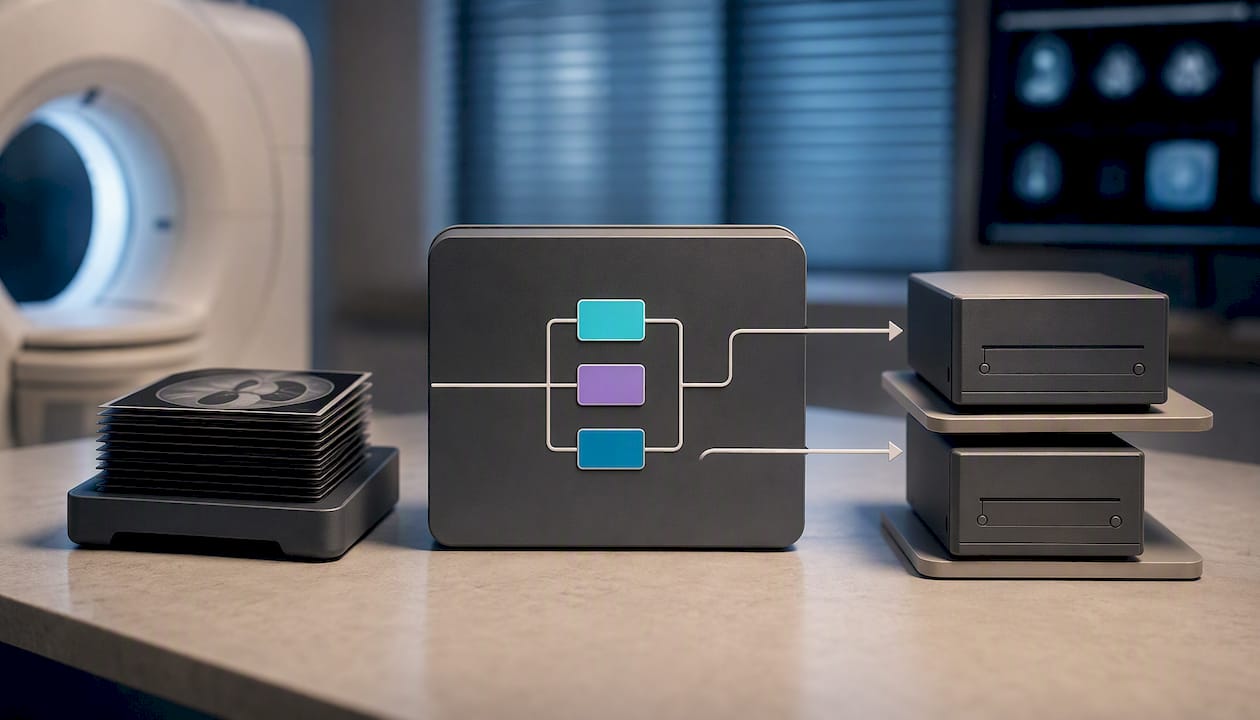
Rules typically evaluate AE Title, modality (tag 0008,0060), StudyDescription, and similar fields, then trigger actions such as add_destination, save_file, or drop, according to DICOM Capacitor's route filter documentation. Routes execute in the order they're written, and a single instance can match multiple routes, each firing its own action. Configuration files (commonly routings.yml in tools like DICOM Capacitor) use tag placeholders to build dynamic file paths, and removal of the original object only happens after every matching action has completed.
Beyond rule matching, a production router handles:
- Store-and-forward buffering so a temporary destination outage doesn't drop studies
- Retry logic with backoff for transient network failures
- Transfer syntax negotiation so compressed or uncompressed formats reach destinations that can read them
- TLS and certificate handling for encrypted transport between sites
Topology varies by scale: a single gateway router works for one facility, a multi-site design chains routers or uses a hub-and-spoke model, and cloud-hybrid setups route on-premises studies to cloud PACS or VNA while keeping a local cache for resilience.
What routing rules and best practices actually reduce misroutes?
Most routing failures trace back to rules that are too broad or too permissive. Tightening the logic, not adding more destinations, is what fixes it. Best-practice rule sets route by modality, AE Title, time of day, patient location, and study description, according to UltraRAD's command-center guidance. Here's the priority order to build them in:
- Route by modality first. CT, MR, and ultrasound studies usually need different downstream destinations (subspecialty viewers, dose-tracking systems, AI triage tools), so modality is the cleanest first filter.
- Add AE Title-based rules for device-level control. This catches cases where two identical modalities in different departments need different destinations, something modality tags alone can't distinguish.
- Layer in time-based and STAT prioritization. After-hours studies often need to reach an overnight reading queue or nighthawk coverage instead of the daytime worklist, and STAT-flagged studies should bypass normal queue order entirely.
- Filter by patient location or department. Emergency department studies, inpatient studies, and outpatient studies frequently have different turnaround expectations and different destination lists.
- Refine with study description or procedure code. This is where subspecialty routing lives, sending mammography to breast imagers and neuro MRI to neuroradiologists, for example.
Avoid the "send everything everywhere" pattern. Broadcasting every study to every possible destination sounds safe but creates queue congestion, duplicate storage costs, and makes it harder to isolate which rule actually caused a misroute when something goes wrong. Deterministic rules, evaluated in a fixed order with no overlapping catch-alls, are far easier to audit six months later.
Pro Tip: Write a one-line comment above every rule explaining why it exists. When someone inherits your router configuration in two years, that comment is the difference between a five-minute fix and a two-hour investigation.
When routing strain becomes a staffing problem
Even a well-configured router can't fix a shortage of subspecialists to read what arrives. When after-hours volume spikes or a backlog builds faster than your team can clear it, the bottleneck stops being technical and becomes a coverage problem instead. AstraRad's teleradiology services integrate directly with your existing PACS, so routed studies land with board-certified subspecialists matched to the modality, without adding another portal for your team to manage.
That matters most during the hours your in-house team can't cover alone. Our STAT reads carry a guaranteed turnaround under one hour, and routine studies are signed within 24 hours, backed by peer review and detailed compliance reporting on every report. Whether you're routing overnight coverage, weekend overflow, or a backlog that's outgrown your current staffing, the fix isn't more routing rules, it's a reading partner who can absorb the volume your router is already sending. Visit the services page to see current coverage options and request a quote for your imaging center or radiology group.
Implementation checklist and configuration essentials
Before writing a single rule, get the groundwork right. Skipping inventory work is the single biggest predictor of routing headaches six months into production.
- Inventory every AE Title, IP address, and port across modalities, PACS nodes, and third-party destinations, and assign an owner to each.
- Standardize AE Title naming conventions and document character-length limits, since some legacy modalities still enforce a 16-character cap.
- Pilot with a limited scope using test studies before opening the router to live traffic, and confirm the destination PACS actually indexes the studies correctly, not just receives them.
- Configure queue and spool sizing based on your peak daily volume, plus retry intervals and backoff timing for each destination.
- Set retention policies for the router's local spool so temporary storage doesn't silently fill a disk during a destination outage.
Once the router is live, governance keeps it reliable:
- Require change control and peer review for any rule edit, no exceptions for "quick fixes"
- Version your AE Title and IP inventory so drift is visible in a diff, not discovered during an outage
- Schedule regular backup and restore tests of the router configuration itself
- Document acceptance limits (max file size, supported transfer syntaxes) per destination
How do you monitor and troubleshoot a DICOM router?
Routing should run as a mission-critical clinical service with the same proactive monitoring discipline as any other production system, not as a background utility nobody checks until a study goes missing. A command-center approach centralizing queue depth, destination health, alerts, and audit trails improves reliability and speeds troubleshooting in complex multi-site environments, according to UltraRAD's operational guidance.
Track these operational metrics continuously:
- Queue depth at each destination, since a growing backlog often signals a downstream problem before anyone notices
- Retry spikes, which usually point to network instability or a destination that's rejecting connections
- Rejection rates, broken down by destination and reason code
- Destination health checks, confirmed with periodic C-ECHO verification, not just assumed from "it worked yesterday"
Most routing failures come from one of three sources: configuration drift where AE Title, IP, or port assignments quietly change on one end without updating the other, network or firewall changes that block a previously open path, and downstream rejections caused by inconsistent patient or study metadata. Maintaining versioned connectivity documentation is the most effective defense against configuration drift, since it turns a mystery outage into a two-minute diff check.
Build a "missing study" workflow before you need it: check the modality's send log, check the router's queue and rejection log, then check destination health, in that order. Set alerts for queue depth thresholds and repeated retry failures rather than waiting for a radiologist to ask where a study went.
How does a router fit with PACS, VNA, AI, and HL7?
A router doesn't replace any of these systems, it coordinates traffic between them. PACS and VNA each own long-term storage and workflow state, while the router owns delivery logic, and vendor documentation for tools like aycan's DICOM router describes this same pattern: automate distribution, prefetch prior studies, normalize metadata and tag mapping, and trigger HL7 actions that tie into RIS and EMR order events.
Practical integration points worth testing before go-live:
- Prefetching priors so relevant history arrives at the reading workstation before the radiologist opens the study
- One-to-many routing that sends the same study to a PACS, an AI triage engine, and a specialty viewer simultaneously
- HL7 order triggers that fire routing rules based on order status changes rather than image arrival alone
- Tag normalization to reconcile inconsistent naming conventions between different scanner vendors
Publisher perspective: running routing as clinical infrastructure
Routing failures don't announce themselves. They show up as a radiologist asking where a study went, twenty minutes after it should have arrived. Turnaround commitments only hold if the studies reach readers the moment they're acquired, which is why every client's routing configuration should be treated as part of the clinical chain, not a background IT detail.
Rafael Vieira
Sources
- Automated routing of DICOM CT, MR, and CR images: Solving the pitfalls of vendor-specific DICOM implementations
- The DICOM routing command center: Your imaging control tower
- DICOM Standard
FAQ
Is DICOM still used?
Yes. DICOM remains the standard imaging format and transport protocol across CT, MRI, ultrasound, and virtually every modality in clinical use, and it underpins how routers, PACS, and AI tools all exchange studies.
Is DICOM the same as PACS?
No. DICOM is the file format and network standard for medical images, while PACS is the archive and workflow system that stores and displays those images once received. A router sits between the two, moving DICOM objects from modalities to the PACS or other destinations based on rules.
How do you transfer DICOM images between systems?
DICOM images transfer through a C-STORE operation after two systems negotiate an association using their AE Titles. A router automates this process across multiple destinations at once, applying rules based on modality, AE Title, or study details rather than requiring a manual send for each destination.
What is a DICOM image file?
A DICOM image file contains pixel data plus embedded metadata tags describing the patient, study, modality, and acquisition details in a single package. That embedded metadata is exactly what routing rules read to decide where the file should go.
Does AstraRad handle routing for the studies it reads?
AstraRad integrates directly with each client's existing PACS rather than requiring a separate routing platform, so studies reach our subspecialists through the connections your imaging center already has in place. Current service details and coverage options are listed on AstraRad's services page.
Recommended
Related on AstraRad
- Resources
Subspecialty coverage matrix for hospital contracts
Download a procurement ready subspecialty coverage matrix template to copy directly into hospital contracts, including SLA figures and RFP test cases.
- Resources
Weekend radiology coverage: the staffing math
What weekend radiology coverage costs in 2026: the staffing math of internal call, weekend hires, locums, and per-report teleradiology, with sources.
- Resources
Pediatric teleradiology for hospital admins
Operational procurement guide for hospital administrators procuring pediatric teleradiology, with peer reviewed turnaround benchmarks (including 1.6%
Put a radiologist's name on your next read.
Tell us your modalities and monthly volume. A complete per-report rate card, with turnaround tiers and SLA terms in writing, lands in your inbox within one business day.